JavaScript Strikes Back (No, Still Not That One): More Adventures in Java Scripting
Picking Up Where We Left Off
A while back, I wrote about how modern Java had quietly become a legitimate scripting language: no manual javac step, no boilerplate, a shebang line, and JBang handling the rest. If you haven't read it, go check it out first. This is the sequel.
I haven't rewritten my whole toolbox since then. But a few things crossed my path, some out of curiosity, others while preparing talks, and they changed how I think about where Java scripting is headed. So let's go through them.
If you'd rather follow along in code, the demos from my talk live in java-script-no-not-that-one, one commit per step, including the Æsh, Quarkus, and TamboUI examples below.
Why JBang Moved Its CLI to Æsh
In my first post, I used Picocli as the go-to for giving scripts proper options, help text, and type conversion. It's still a solid choice. But while poking around the JBang repository, I found out the project had recently moved its own CLI off it and onto Æsh. The team explains why in an article on the JBang site, and the reason is interesting.
It comes down to reflection. Picocli discovers your commands and options at startup by inspecting annotated fields. That's fine for a script you launch a few times a day, much less so when the tool is called constantly. JBang is in that second camp: during shell tab-completion, almost every key you press can trigger it. Æsh generates the parsing code at compile time through annotation processing, so there's no discovery cost to pay at startup.
Picocli does ship an annotation processor too (picocli-codegen), but its main job is catching mistakes at compile time and generating GraalVM native-image configuration. On a regular JVM, parsing still relies on runtime introspection.
The same migration write-up puts numbers on it. Keep in mind these are JBang's own CLI startup measurements, before and after the switch, so they tell you how the two libraries behave as JBang's parser. They don't say much about Picocli in your app.
| Environment | Picocli | Æsh | Speedup |
|---|---|---|---|
| Native image | 33ms | 6ms | 5.5× |
| JDK 25 | 228ms | 109ms | 2.1× |
| JDK 11 | 269ms | 149ms | 1.8× |
For an occasional script, that gap is probably dwarfed by whatever the code actually does. But when a tool fires on every keystroke, those milliseconds add up quickly.
Trying Æsh Myself
None of my scripts had hit a wall. I was simply curious about the library my everyday tooling had switched to without me noticing. I don't have a production use case for it yet, but it's the kind of tool I'll reach for the day I want a script that holds a conversation with me.
Æsh comes in two layers. On top sits a command framework (org.aesh:aesh) that handles option binding, help generation, and completion; that's the piece you'd compare to Picocli. Underneath lives org.aesh:readline, a lower-level library for terminal input. My example only touches that bottom tier, since all I wanted was a prompt that reads what you type and reacts to it. You'll need JDK 25 for the void main() shorthand. On an older JDK, wrap it in a class with a regular public static void main(String[] args):
///usr/bin/env jbang "$0" "$@" ; exit $?
//DEPS org.aesh:readline:3.18.4

import org.aesh.readline.Readline;
import org.aesh.readline.ReadlineBuilder;
import org.aesh.terminal.tty.TerminalConnection;
import java.io.IOException;

void main() throws IOException {
    var connection = new TerminalConnection();
    var readline = ReadlineBuilder.builder().build();
    prompt(connection, readline);
    connection.openBlocking();
}

void prompt(TerminalConnection connection, Readline readline) {
    readline.readline(connection, "duke> ", input -> {
        if (input == null || input.equals("quit")) {
            connection.write("Bye!\n");
            connection.close();
            return;
        }
        connection.write("You said: " + input + "\n");
        prompt(connection, readline);
    });
}
Save it as duke-prompt.java, then:
jbang duke-prompt.java
And you've got a working REPL, history and line editing included, without any BufferedReader gymnastics.
That REPL never touches the command framework, though, and that's where the speed story from JBang's migration lives. So here's the other half of Æsh: dog, a small cat clone (it fetches files, obviously) running inside an interactive console of its own:
///usr/bin/env jbang "$0" "$@" ; exit $?
//JAVA 25+
//DEPS org.aesh:aesh:3.18.3
//DEPS org.aesh:aesh-processor:3.18.3
//JAVAC_OPTIONS -proc:full
//JAVA_OPTIONS --enable-native-access=ALL-UNNAMED

import java.io.BufferedReader;
import java.io.FileReader;
import java.io.IOException;
import java.nio.file.Files;
import java.nio.file.Path;
import org.aesh.AeshConsoleRunner;
import org.aesh.command.Command;
import org.aesh.command.CommandDefinition;
import org.aesh.command.CommandResult;
import org.aesh.command.invocation.CommandInvocation;
import org.aesh.command.option.Argument;
import org.aesh.command.option.Option;

@CommandDefinition(name = "dog", description = "fetch a file's contents, dog-style", generateHelp = true)
public class DogAesh implements Command<CommandInvocation> {

    @Option(shortName = 'n', name = "number", hasValue = false,
            description = "number the output lines")
    boolean numbers;

    @Argument(description = "the file to fetch")
    String file;

    public static void main(String... args) {
        AeshConsoleRunner.builder()
                .command(DogAesh.class)
                .prompt("[dog]$ ")
                .addExitCommand()
                .start();
    }

    @Override
    public CommandResult execute(CommandInvocation inv) {
        var path = Path.of(file);
        if (!Files.isRegularFile(path)) {
            IO.println("🐕 can't fetch " + file + ": no such file");
            return CommandResult.FAILURE;
        }
        printFile(path);
        return CommandResult.SUCCESS;
    }

    private void printFile(Path path) {
        IO.println("🐕 " + path);
        try (BufferedReader reader = new BufferedReader(new FileReader(path.toString()))) {
            String line;
            int lineNumber = 1;
            while ((line = reader.readLine()) != null) {
                if (numbers) {
                    IO.print("\t" + lineNumber);
                }
                IO.println("\t" + line);
                lineNumber++;
            }
        } catch (IOException ioe) {
            ioe.printStackTrace();
        }
    }
}
Save it as DogAesh.java and run jbang DogAesh.java. You land on a [dog]$ prompt where dog -n DogAesh.java prints the file with line numbers, dog --help shows the generated usage text, and exit leaves.
If you've used Picocli, this will feel familiar: an annotated class, an @Option for the flag, an @Argument for the file, help for free. The twist is that parsing happens inside a prompt that stays open between commands. A few header lines deserve a closer look, though:
aesh-processorand-proc:fullare what take the runtime lookups out of parsing. Since JDK 23,javacno longer runs annotation processors it finds on the classpath unless you ask, and Æsh doesn't complain when its processor is missing: it silently falls back to inspecting your class at runtime. Leave either one out and you get exactly the behavior JBang moved away from.- The fields are package-private for the same reason. Private ones still have to be set through
setAccessible()at runtime, and the processor warns you about it at compile time. --enable-native-access=ALL-UNNAMEDsilences a JDK 25 warning: Æsh's terminal layer calls into libc through the Foreign Function & Memory API, and the JVM wants you to allow that explicitly.
Quarkus and the Joy of Live Reload
Ahead of my session at the Quarkus Club, I reopened the framework to build the demo and was reminded how pleasant its dev loop feels, even when you're building a CLI tool.
I went with a Maven project to keep commands, services, and tests tidy. Single-file JBang scripts also work through the framework's preview scripting integration, so the Maven layout was just my preference.
The quarkus-picocli extension let my commands inject those services directly, like any other Quarkus bean. Here's an excerpt; the official Picocli guide has the full runnable project:
@CommandLine.Command
public class GreetCommand implements Runnable {

    @CommandLine.Option(names = {"-n", "--name"}, defaultValue = "World")
    String name;

    @Inject
    GreetingService greetingService;

    @Override
    public void run() {
        greetingService.sayHello(name);
    }
}
Run mvn quarkus:dev, and per the guide, "the application is executed and restarted every time the Space bar key is pressed" in the terminal. Press space and your command reruns with your latest code, without a manual rebuild. You do give up the single-file format, but you get a project structure that keeps a growing tool maintainable as it picks up features. When you're live-coding on stage, I'll take that trade every time.
TamboUI and a Duke Who Dodges Cacti
Terminal UIs are having a moment. Go has Bubble Tea, Python has Textual, Rust has Ratatui, and for a long time Java didn't have much to put on that list. That's where TamboUI comes in. It's an idiomatic Java port of Ratatui, with widgets, an event loop, and a CSS-like style engine you can hot-reload while the app is running.
I used it to build a small, entirely unnecessary take on the Chrome dinosaur game, starring Duke: Duke Runner. You jump over obstacles, and every hundred points the game reskins itself with a bit of platform history, cycling the accent and ground colors through Java 1 → 5 → 11 → 21+. It's only a little wink, handled by an enum.
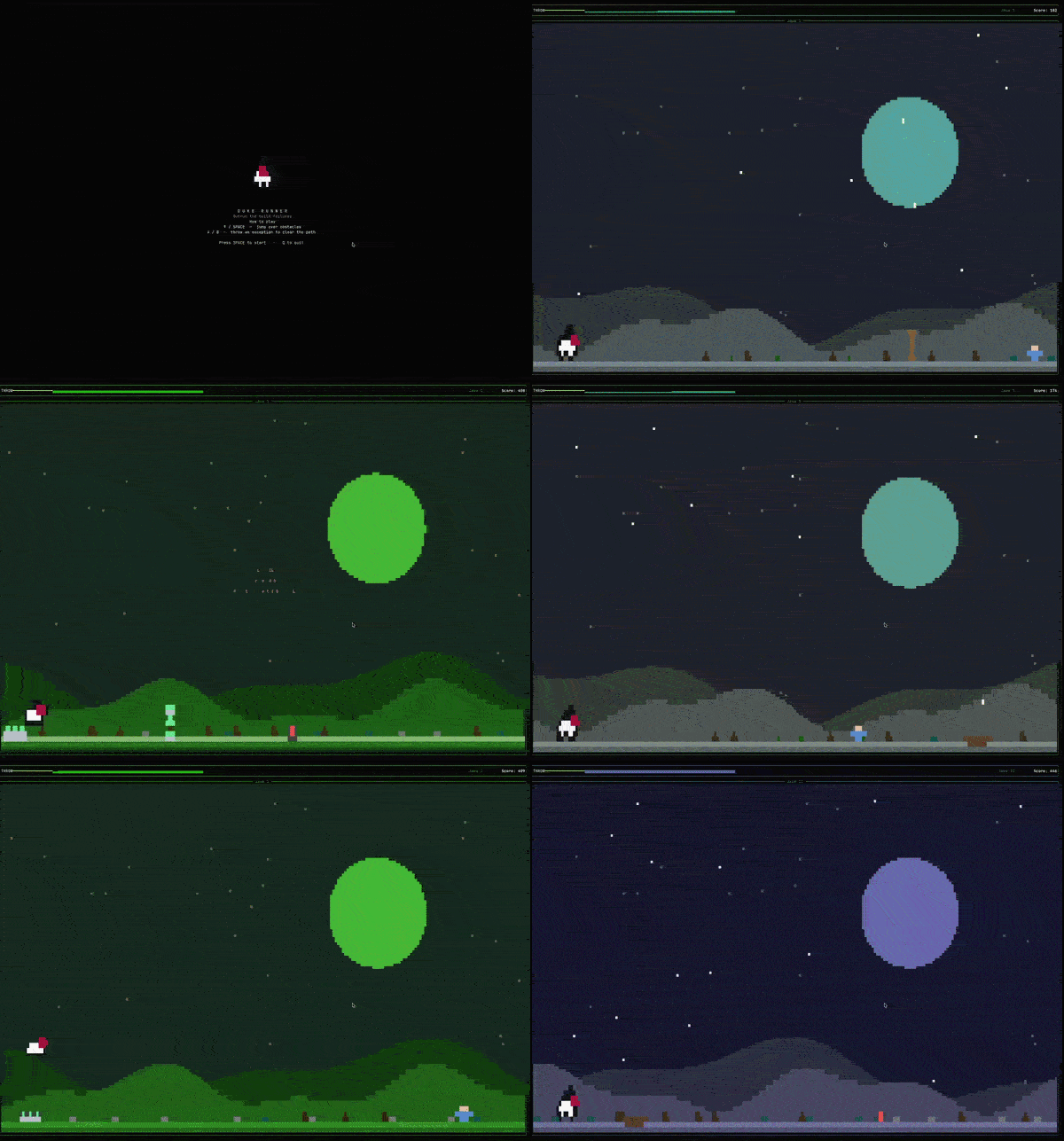
No need to clone anything. JBang can run the released jar straight from its URL:
jbang --java 26+ https://github.com/LoMagnette/DukeRunner/releases/download/v0.2.1-alpha/duke-runner-tui.jar
(You'll need JBang and Java 26+, the latter for no better reason than that I could. Space/↑ to jump, hold for a higher one, Shift to throw, Q to quit.)
My biggest takeaway from the build: with the TuiRunner API, your callback receives key, tick, and resize events and returns whether to redraw, while rendering lives in a separate function invoked with your state each frame. So I kept everything (score, era, player position, the list of obstacles) in a plain Game object, updated on each tick and key press, and handed it to Renderer.render(frame, game) to draw.
That separation paid off more than I expected. Since the core logic knows nothing about the terminal, I could build a JavaFX version that reuses the state machine, physics, and collision code. Only the rendering layer changes, so it's the same Duke dodging the same cacti on two very different screens.
TamboUI is still young, so expect rough edges and APIs that keep moving. But if you've ever wanted to build a real TUI tool in Java instead of reaching for Go or Rust "because that's where the TUI libraries are," this is the one to watch.
Crema: javac Without the Warm-Up
Last one, and the most experimental. I would probably never have heard of it on my own. While I was preparing my talk on Java scripting for Devoxx Belgium, Thomas Wuerthinger from the GraalVM team reached out to me on LinkedIn. He walked me through what his team was working on and shared a demo to show it in action. That's the kind of exchange I love about this community.
It's called Crema. The idea is to take the Java compiler itself and build it ahead of time into a native binary, bundled with a launcher. What you get is a single executable that can turn a source file into a running program on the spot, without booting a traditional JVM just to do the compiling.
Trying it yourself takes GraalVM 25.4.4 and a C toolchain (Xcode Command Line Tools on macOS). If you use SDKMAN!, getting the right GraalVM is as easy as installing it once and switching to it in your current shell:
sdk install java 25.4.4+1-graal
sdk use java 25.4.4+1-graal
sdk use only changes the JDK for that terminal session, so your default Java stays untouched. Then clone the repository, build the launcher, and run the bundled hello world:
./build.sh
./run.sh examples/HelloWorld.java
The remaining samples accept arguments, like any regular script:
./run.sh examples/ListDirectory.java .
./run.sh examples/WordCount.java README.md
./run.sh examples/FindFiles.java '*.java' examples
./run.sh examples/Sha256.java README.md
Keep the build output together: the native executable needs its companion libraries next to it at runtime. These are the same five scripts used in the benchmark below.
Its benchmark data is public, collected on macOS ARM64. Here are the mean end-to-end timings per example, compilation and execution included:
| Script | Crema | OpenJDK | Speedup |
|---|---|---|---|
| HelloWorld | 28ms | 203ms | 7.3× |
| ListDirectory | 44ms | 254ms | 5.7× |
| WordCount | 43ms | 251ms | 5.9× |
| FindFiles | 46ms | 267ms | 5.8× |
| Sha256 | 47ms | 257ms | 5.5× |
On these sample scripts, the published total runtimes drop from between 203 and 267 ms with OpenJDK to between 28 and 47 ms with Crema. For small scripts like these, running a Java file starts to feel instant. Of course, it's still experimental GraalVM tooling that I wouldn't put in a production pipeline tomorrow, and I haven't reproduced these numbers myself. I'll be following it closely, though.
Wrap-Up
If I had to turn all this into a rule of thumb: stay with a plain JBang file for anything you'd finish in one sitting. Reach for Æsh once the script needs to talk back and keep a prompt open. Move to a full Quarkus project when the tool benefits from multiple classes, dedicated tests, and a structured build, or you're about to demo it in front of people and want the dev loop back. And pull out something like TamboUI when the output genuinely deserves a screen instead of a few lines of stdout. Crema isn't something to pick yet, but if JVM startup is the reason you still write throwaway scripts in Bash, it's worth following.
AI agents give me one more reason to care about all this. Agent skills (folders of instructions an agent loads when a task calls for them) often ship with scripts the agent runs to do the actual work. Those scripts need to be portable and reusable: they should run the same way on your laptop, on a colleague's, and in a CI container, without anyone setting up an environment first. A single Java file with its dependencies in //DEPS lines and its JDK version pinned with //JAVA, launched by JBang, does exactly that, as long as JBang is there (and it will even fetch the right JDK for you). You don't activate a virtualenv or install node_modules, and the compiler catches a whole class of mistakes before anything runs. For the scripts behind your skills, Java makes a lot of sense.
The core pitch from my first post still holds. What changed is the ecosystem around it: JBang got a faster CLI parser, Quarkus gave me a reason to go back to Maven, Duke can now outrun cacti in a terminal, and a natively compiled javac brings a script's total runtime down to a few dozen milliseconds. I'll keep poking at this corner of Java and report back when something else sticks.